 |
support@rfktm.com |
| 30 Day Free Trial |
| Built for Small to Medium size manufacturing and facilities. Created to support unlimited number of locations. No License Per User, Unlimited. |
| Never miss a work order Automated work order generation and dashboard visibility assist in never missing a maintenance requirement. Using the RFCMMS Middle ware module, you can use runtime hours as an indicator. |
| Friendly for All Users Designed and laid out so even the novice user can navigate and enter details into a work order that helps increase accuracy. |
| Accurate Inventory Tracking Easy and informative inventory helps to insure you have the parts to perform your work. Create kits so no part gets missed when adding to a work order. |
User Friendly Work Orders
with Detailed Information Capture details to assist you in finding patterns, determining what to include in CapEx, necessary products to keep in inventory and increased communication. Built-in "Tie-In Log" so cross shifts and management can see what has been happening on a daily bases. 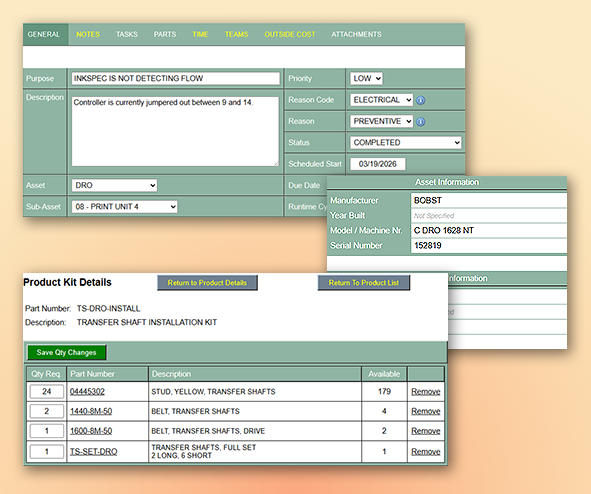 |
Data Mining for Viewing
Detailed History Our reports use straight up data and not flashy charts. These views allow you to select the rows and information to display the related information. Reports such as Work Order Activity, Asset Drilling, Monthly Completions, Base on Reason Codes, etc. 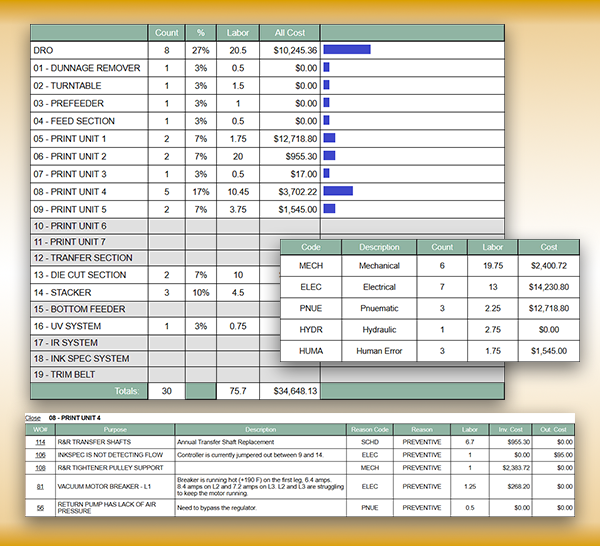 |
Connect to your machines and
collect the Actual Runtime Hours With the RFCMMS Middleware application, you can get the live starts and stops of your machines. A report has been created to show "Starts and Stops", Total Runtime, Daily Runtime, Weekly Runtime, Average Runtime and what other machines are currently running. This report helps to make informed scheduling decisions. This report auto-updates so you can put it on a screen or TV for a constant display of status. 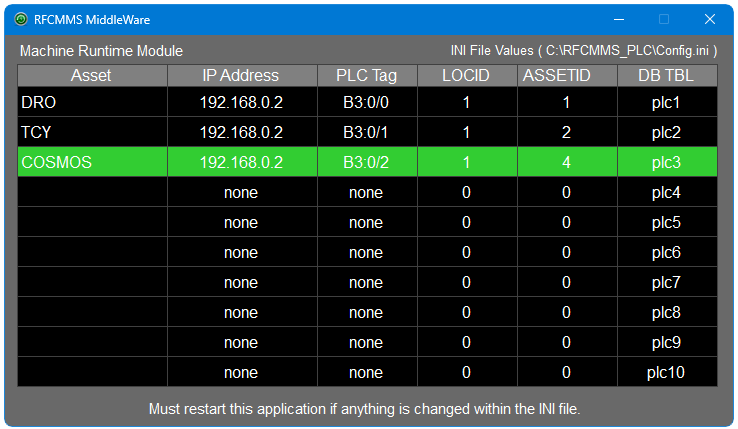 |
RFCMMS Mobile
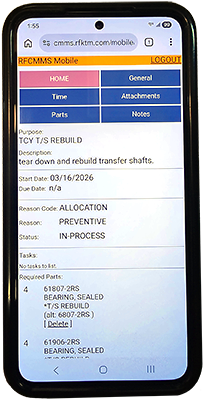
95% of the work order features are available on the phone app. Create and close a work order, recording your labor hours, take pictures or video, make notes, look up inventory and record consumable product usage. A great tool to be mobile. |
 |
| For more information, use a desktop or laptop to see more at rfktm.com |
| Contact us at support@rfktm.com for any questions. |